
PRODUCTS
SafeBox
Turn your local computer into an advanced tool

What is SafeBox?
SafeBox is a desktop application that integrates seamlessly into your Windows environment, adapting to your workflows and daily operations. It provides access to Qualified Trust Services and centralized cloud-based certificates, all through familiar commands on your computer.

The tool that you need to access certificates, sign, encrypt and validate documents.
The tool that you need to access certificates, sign, encrypt and validate documents.
The tool that you need to access certificates, sign, encrypt and validate documents.
If you only need to access your certificates, simply log in by clicking on the ANF AC icon that appears in your taskbar.
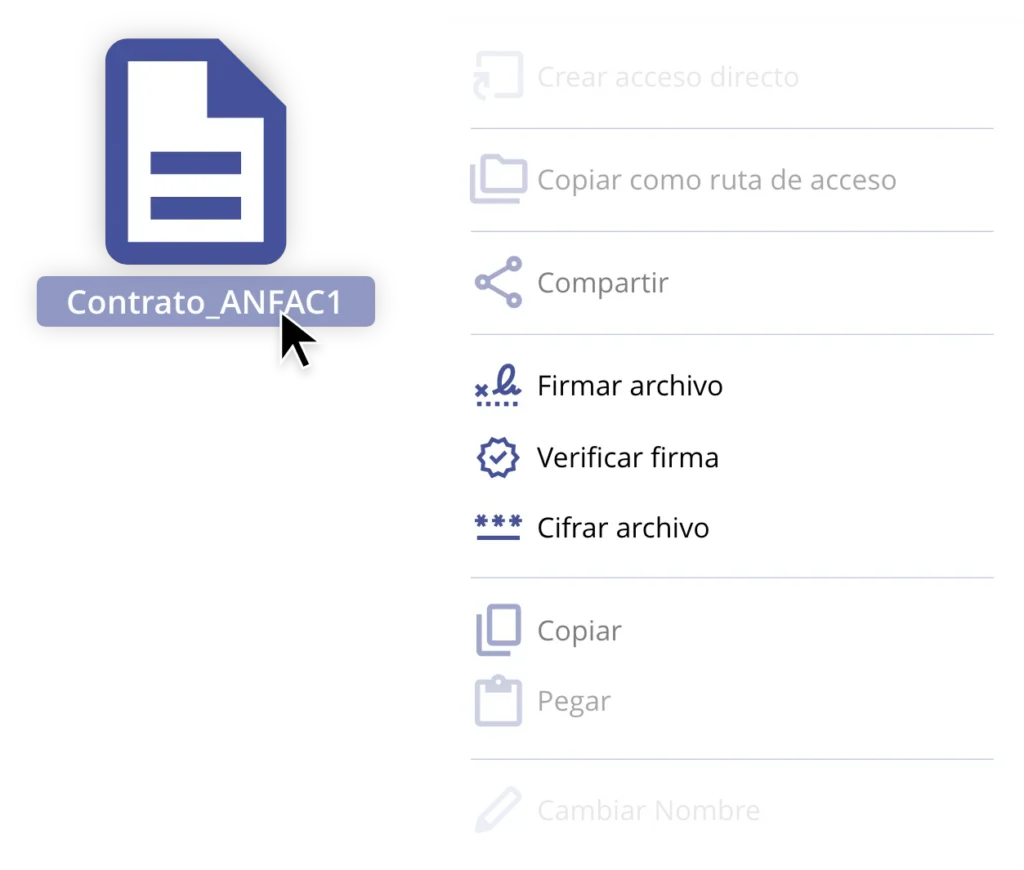
If you need to sign documents, perform qualified validation of a document or signature, or encrypt a file for secure transmission, just right-click on the file you want to process and select the desired option.
Why should I use SafeBox?
Accessibility and Security
Access your qualified certificates hosted in the cloud directly from your computer—no downloads or backups that could be lost.
Qualified Signatures
Achieve maximum effectiveness and legal certainty with signatures that are legally equivalent to handwritten ones.
Ease of Use
Do you know how to copy a file in Windows? If the answer is yes, you already know how to use SafeBox—just right-click with your mouse.
Qualified Validation
Obtain binding qualified validation in less than 30 seconds.
Encryption
Apply self-executing encryption before sharing data, with no need for the recipient to install any software.
SafeBox® Quality Management Plan
ANF Certification Authority complies with all minimum requirements established in the Official State Gazette No. 313, dated December 30, 2021, for the category 'Virtual Office Tools and Services.
Cases of the most common uses
Allows guard contracts, lawsuits, or written with a digital signature, validate them in seconds, and encrypt it for safe shipping, guarantee of confidentiality and legal evidence at all times.
Facilitates the documentary management of the area, allowing you to sign and encrypt payroll, contracts or certificates work safely, with traceability and without paper.
Reduces completely the use of paper in the enterprise, integrating the signature and encryption of digital files in internal and external processes.
Integrates with flows ERP to sign and encrypt documents automatically fiscal, administrative or accounting before being archived or sent.
Allows you to validate and safe keeping of budgets, contracts, and agreements with digital signature, ensuring the integrity of the document and avoiding manipulation.
Protects documentation sensitive records, license plates or communications with electronic signature and encryption, preventing unauthorized access.
Offers maximum security to sign and guard reports, extracts or authorizations, compliance with standards of confidentiality and traceability.
Allows you to sign, encrypt and validate legal documents, tax or directly from the desktop, reducing risk and facilitating audits.
Custody digital informed consent, records or authorizations, electronically signed and encrypted to preserve the privacy of the patient.
Facilitates the signing, validation, and file encryption of official documents with full legal validity, speeding up procedures without compromising safety.
What are the main features of SafeBox®?
SafeBox® offers three core functions:
- Sign files with an e-certificate: Digitally sign a file using a qualified certificate.
- Validate signatures in files: Verify whether a file has been correctly signed and if the signature is valid.
- Encrypt files: Protect a file by generating an encrypted version, ensuring secure storage and sharing.
How do I access SafeBox®?
You can use SafeBox® by right-clicking on a file on your computer and selecting the option you need—sign, validate, or encrypt.
What is signature validation in SafeBox®?
Signature validation checks whether a file has been electronically signed and if that signature is valid, ensuring the file has not been modified since it was signed.
In what format are files encrypted with SafeBox®?
When you encrypt a file with SafeBox®, it generates a secure archive that can only be opened by authorized users. This protects the integrity and confidentiality of the information.
Is SafeBox® difficult to use?
No. SafeBox® is very easy to use. It works just like common Windows actions such as copy or paste: simply right-click and select the desired option.
Why is SafeBox® unique in the market?
SafeBox® stands out by offering advanced signing and encryption features in a simple way, allowing users to maintain their usual Windows experience without the need to learn complex programs.
What is an electronic certificate, and why is it important for SafeBox®?
An electronic certificate is a digital file that verifies a person’s identity and enables secure digital signing of files. SafeBox® uses certificates to ensure that signatures are valid and that files are properly protected.
Which operating systems support SafeBox®?
SafeBox® is available for computers running the Windows operating system, providing fast and seamless integration for any Windows user.

Do you have any questions?
We're here to help
ANF AC needs the contact information that you provide to us to contact you about our products and services. You can unsubscribe from these communications at any time. For information on how to unsubscribe, as well as our privacy practices and commitment to protecting your privacy, see our privacy Policy.